What is the difference between a market order and a limit order?
When placing an order, you can choose between a market order and a limit order. The main difference is speed versus price control.
What are "Time in Force" (TIF) options, and how do they work?
Time in Force (TIF) defines how long an order remains active before it is either executed or canceled. Bybit offers three main TIF options:
1. Good Till Canceled (GTC):
- Remains active until fully executed or manually canceled.
- Best for traders who want to wait for their target price without time constraints.
2. Fill or Kill (FOK):
- Must be fully executed immediately at the specified price or better. Otherwise, it will be canceled entirely. Partial fills are not allowed.
- Best for high-volume traders who require full execution without partial fills.
3. Immediate or Cancel (IOC):
- Must be executed immediately at the specified price or better. Any unfilled portion will be canceled.
- Best for traders seeking instant execution and willing to accept partial fills.
What is the difference between a "trigger" and an "execution"?
The trigger price is the price that activates your order, while the execution price is the actual price at which your trade is filled.
- Triggering: This is the initial signal that the market has reached your specified last, mark, or index price.
- Execution: This is when the trade is completed, after the system verifies your margin and order parameters at the moment the trigger condition is met.
Because market conditions can change rapidly between the trigger and execution, the final execution price may differ from your trigger price. This difference is known as slippage.
What are the pros and cons of using the last traded price, mark price, or index price to trigger your conditional orders?
Bybit allows you to choose different price types to trigger your conditional orders, giving you greater control over how your trades are executed.
Why did my limit order execute immediately?
This usually happens when your order price is more aggressive than the current market price, making it immediately executable.
- Buy order: Your price is higher than the best ask (seller price).
- Sell order: Your price is lower than the best bid (buyer price).
Note: If you want your order to be added to the order book without immediate execution, enable the Post-Only option.
Why was my order not filled?
If your order was not filled, it is usually due to one of the following reasons:
- Your price was not reached: Limit orders only execute at your specified price or better. If the market does not reach your price, the order will remain open.
- Insufficient liquidity at your price: Even if the market reaches your price, there may not be enough available orders to fully fill it. This can result in a partial fill or no fill.
- Your order is waiting in the queue: Orders at the same price are filled based on price-time priority, meaning earlier orders are executed first.
- Order restrictions prevented execution: Certain order settings, such as Post-Only, Reduce-Only, or conditional order requirements, may prevent your order from being executed.
Why was my limit order filled at a different price than my limit price?
This usually happens when your limit order is immediately matched with better prices available in the order book. When your order is executed, it is always filled at the best available price.
Example:
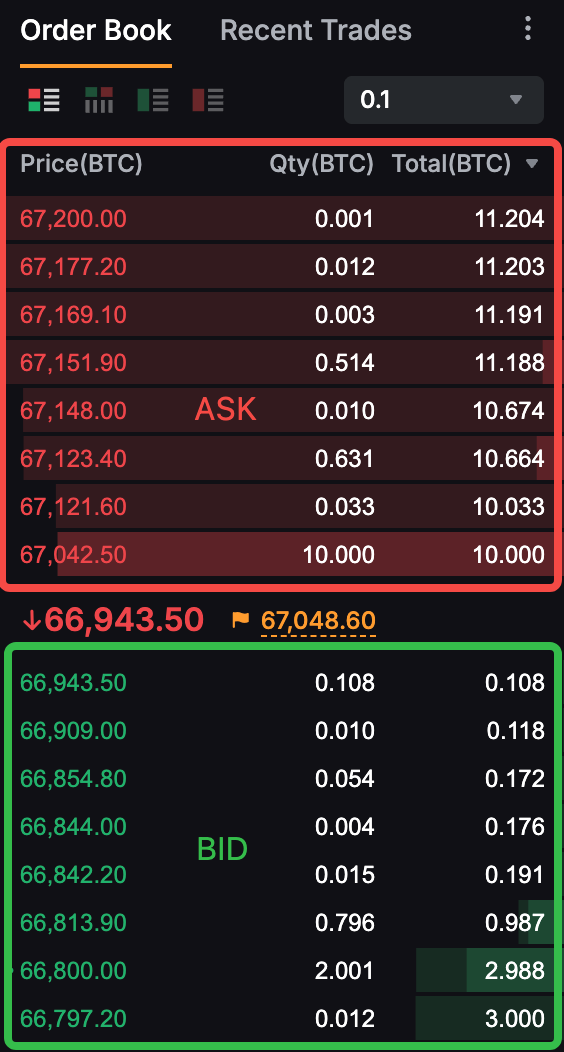
Buy order
- Best ask price: $67,042.50
- Your limit price: $67,080
- Execution price: $67,042 (The order will be filled at the best available price until the contract quantity is met or until $67,080, whichever comes first.)
Sell order
- Best bid price: $66,943.50
- Your limit price: $66,930
- Execution price: $66,943 (The order will be filled at the best available price until the contract quantity is met or until $66,930, whichever comes first.)
Note: If Price Correction is enabled, the system will automatically adjust your order price if it is less favorable than the current market price and would otherwise be executed immediately.
What is Price Correction?
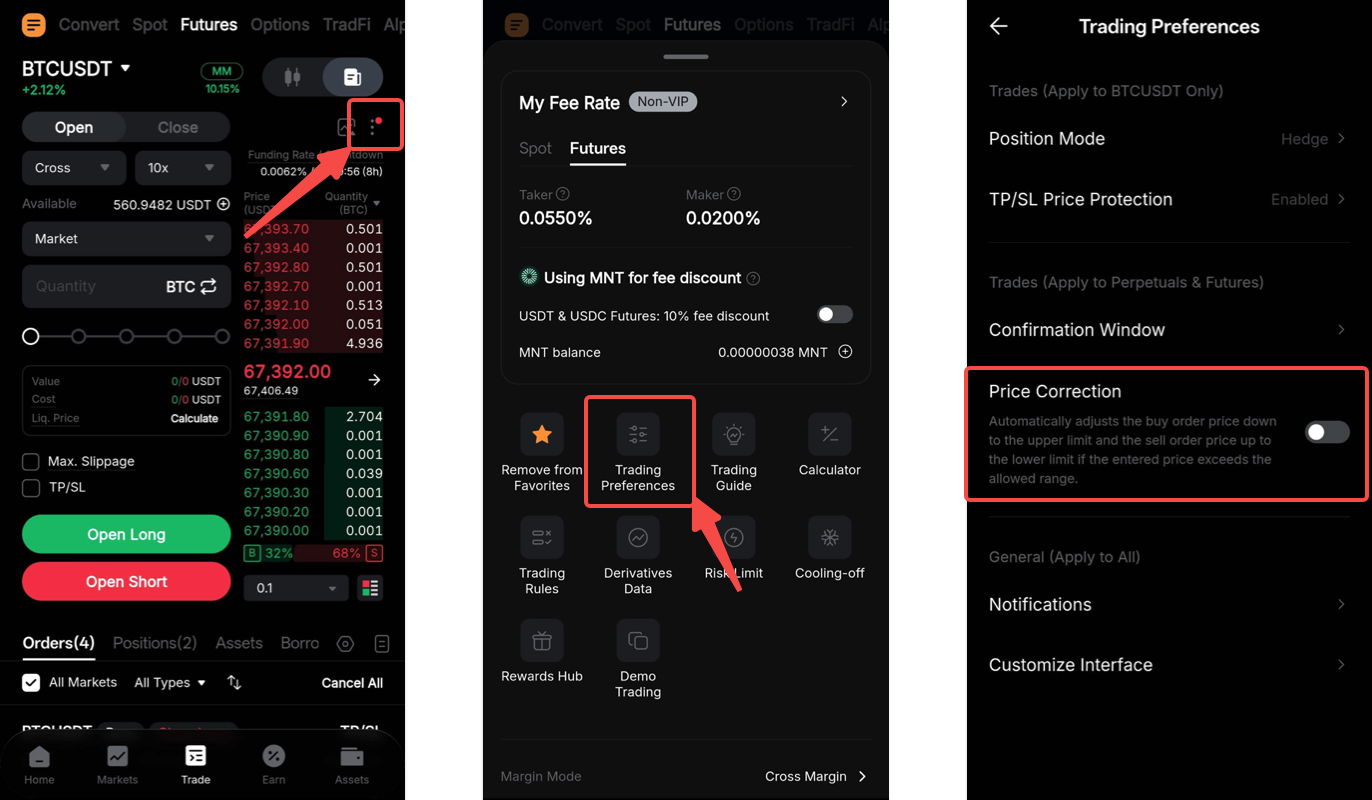
Price Correction automatically adjusts order prices that fall outside the allowed price range to the nearest valid limit. This helps ensure your order can be placed successfully without requiring manual adjustments.
- Buy orders placed above the allowed range will be adjusted to the upper price limit.
- Sell orders placed below the allowed range will be adjusted to the lower price limit.
Note: This feature is enabled by default for Futures trading and disabled by default for Spot trading.
How can I enable Price Correction for Perpetual and Expiry Contracts?
On the Bybit App, go to the Trade page, tap the ellipsis icon in the top-right corner of the order book, and select Trading Preferences. Then, locate Price Correction and toggle it on.
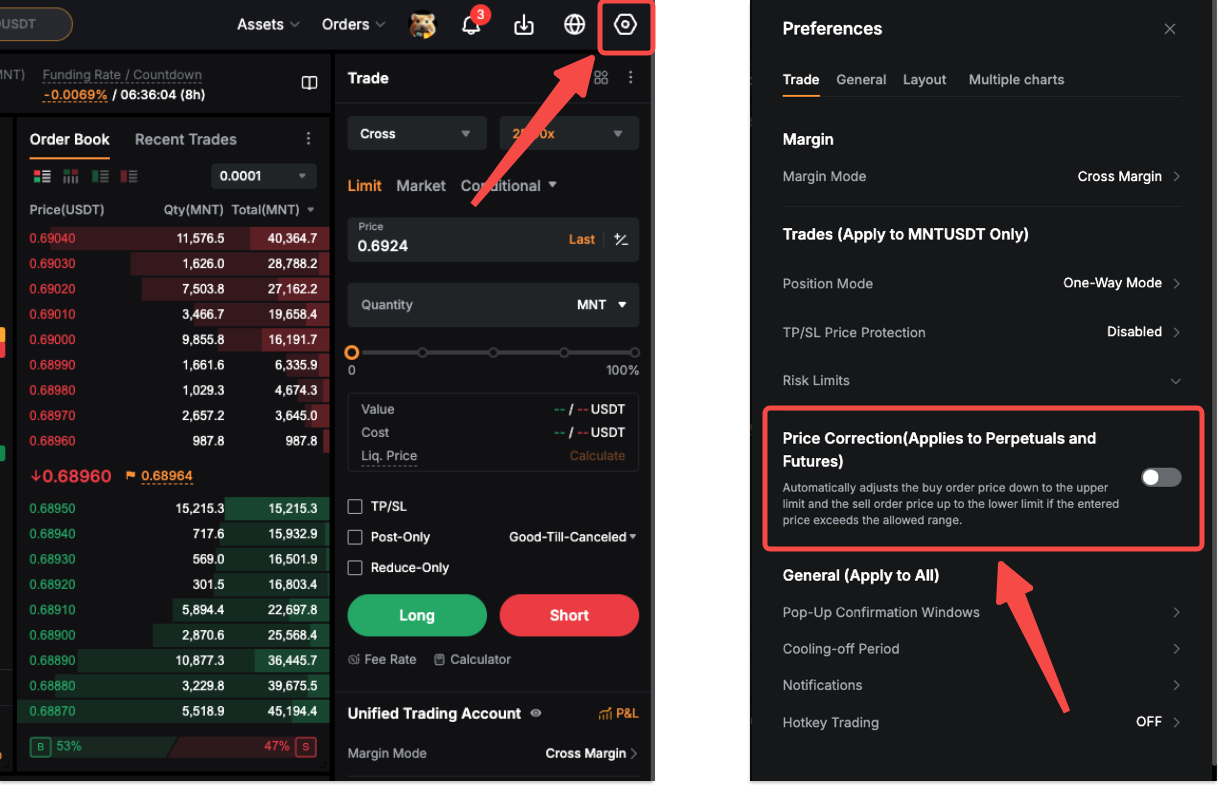
On the website, go to the trading page and click the Settings icon in the top-right corner to access Preferences. Under the Trade tab, locate Price Correction and toggle it on.
Why is my market order filled at a different price than the current market price?
This price difference is known as slippage. The last traded price (LTP) shown in the order book reflects only the price of the most recently completed trade. However, your order is executed based on the available liquidity in the order book:
- Buy orders are filled against the lowest available ask prices.
- Sell orders are filled against the highest available bid prices.
If there is not enough liquidity at a single price level, your order may be filled across multiple price levels, resulting in a different average execution price.
What is market order slippage?
When you place a market order, it is executed immediately at the best available price in the order book. If your order size is large, or if the market is moving quickly, the system may need to "move through" multiple price levels in the order book to fully fill your order.
- Buy orders: If there is not enough quantity at the best ask price, the remaining portion will be filled at the next available higher prices.
- Sell orders: If there is not enough quantity at the best bid price, the remaining portion will be filled at the next available lower prices.
- Mark price differences: Slippage may also occur when your order is triggered by the mark price but executed using the last traded price (LTP), as these prices can differ based on market conditions.
Important:
Slippage is a normal market behavior and can occur in any trading environment, especially during periods of high volatility.
How can I reduce slippage?
While slippage cannot be completely avoided, you can reduce its impact by:
- Using limit orders: Limit orders allow you to control your execution price, although execution is not guaranteed.
- Trading during periods of high liquidity: Higher liquidity typically results in tighter spreads and lower slippage.
- Reducing your order size: Larger orders are more likely to consume multiple price levels, increasing slippage.
- Setting a slippage tolerance: This allows you to specify a maximum acceptable price deviation. If the market price moves beyond this range, the order will be canceled. For more information on how to place a Market Order with Slippage Tolerance, please refer to here.
Why was my conditional order triggered but not executed?
This can occur for one of the following reasons:
1. Insufficient margin
Placing a conditional order does not require margin, but executing it does. If your available balance is too low when the order is triggered, it will be rejected.
2. Incorrect "Close on Trigger" setting
This feature is only used to close an existing position. If it is enabled when opening a new trade and no position exists, the order will be rejected.
3. Order price does not meet the minimum requirement
Your order price must be within 10% of the last traded price (LTP) when triggered. If your price is more than 10% below the LTP, the order will be rejected.
4. Waiting for a better price ("New" status)
For conditional limit orders, the order will only execute if the market reaches your specified price. Until then, the order remains in "New" status (active but unfilled) unless you cancel it.
5. Post-Only setting enabled
This setting ensures your order is placed as a Maker order to earn rebates (if applicable) and avoid Taker fees. The order will be canceled if the system detects that it would be executed immediately.
What is liquidation?
Liquidation occurs when your losses approach your margin limit. When this happens, the system will automatically close your positions to manage risk.
For more details on how the liquidation process works, please refer to Trading Rules: Liquidation Process (Unified Trading Account).
When does liquidation occur?
Liquidation is triggered when your account risk level reaches the liquidation threshold:
- Isolated Margin mode: Liquidation occurs when the mark price reaches the position's liquidation price.
- Cross Margin and Portfolio Margin modes: Liquidation occurs when the account maintenance margin ratio (MMR) reaches 100%.
In all cases, the mark price is used as the trigger reference instead of the last traded price to help prevent unnecessary liquidations caused by abnormal price fluctuations.
What is the liquidation price?
The liquidation price is the price level at which your position is taken over by the platform's liquidation engine to prevent further losses when your margin becomes insufficient to maintain the position.
Note: In Cross Margin and Portfolio Margin modes, the displayed liquidation price is for reference only. It is calculated based on a worst-case risk scenario and changes dynamically as your account equity and margin usage change. Actual liquidation is determined by your account MMR, not strictly by this reference price.
Why is my liquidation price "for reference only" in Cross Margin mode?
In Cross Margin mode, your entire available account balance is used to maintain your open positions.
- Dynamic calculation: Your liquidation price is not fixed and changes whenever you open new positions or as the value of your existing positions fluctuates.
- Reference point: The displayed liquidation price is a snapshot based on your current balance and market conditions.
Liquidation trigger: Liquidation only occurs when the mark price reaches a level where your total account equity is no longer sufficient to cover the maintenance margin for all positions.
How is liquidation executed?
Once liquidation is triggered, your position will be taken over by the liquidation engine. The system will then attempt to close the position at the bankruptcy price, which is the point where your position margin is fully depleted.
What is the bankruptcy price?
The bankruptcy price is the exact price at which your losses equal your entire initial margin, meaning the collateral for that position is fully depleted.
How does the liquidation process work?
For Perpetual and Expiry Contracts, three margin modes are supported: Isolated Margin, Cross Margin, and Portfolio Margin. The liquidation process differs for each mode.
For more details, refer to Trading Rules: Liquidation Process (Unified Trading Account).
Why was my position liquidated despite setting a stop-loss order?
Liquidation is based on the mark price, while many traders set their stop-loss orders to be triggered by the last traded price (LTP).
If the mark price reaches your liquidation level before the LTP reaches your stop-loss trigger, your position will be liquidated first.
Why was my position liquidated even though the chart price did not reach my liquidation price? (Isolated Margin mode)
This usually happens because Bybit charts display the last traded price (LTP) by default. However, under the Dual-Price Mechanism, liquidation is triggered by the mark price (shown in yellow in the order book), not the LTP. The liquidation engine takes over once the mark price reaches your liquidation price.
Because Perpetual Contracts have their own supply and demand dynamics, the LTP and mark price can differ. If your stop-loss order is triggered by the LTP and is set very close to your liquidation price, the mark price may reach the liquidation level first.
Example
Suppose you have a long position with:
- LTP: 12,050 USDT
- Liquidation price: 12,000 USDT
- Stop-loss level: 12,030 USDT (triggered by LTP)
You could still be liquidated. For instance, if the mark price drops to 12,000 USDT while the LTP remains at 12,050 USDT, the system will trigger liquidation because the mark price reached the threshold first.
Why can't I find the bankruptcy price on the trading chart?
The bankruptcy price is a risk management reference used by the liquidation engine and is not a tradable market price. As a result, it is not displayed on the trading chart.
Trading charts typically display the last traded price (LTP) and mark price, while the bankruptcy price is only used by the system during the liquidation process.
How can I check my liquidation history?
On the Bybit App, go to the Trade tab in the bottom menu, then tap the history icon in the bottom-right corner of the order book. Switch to the Trade History tab and select Liquidation from the Filled Type filter.
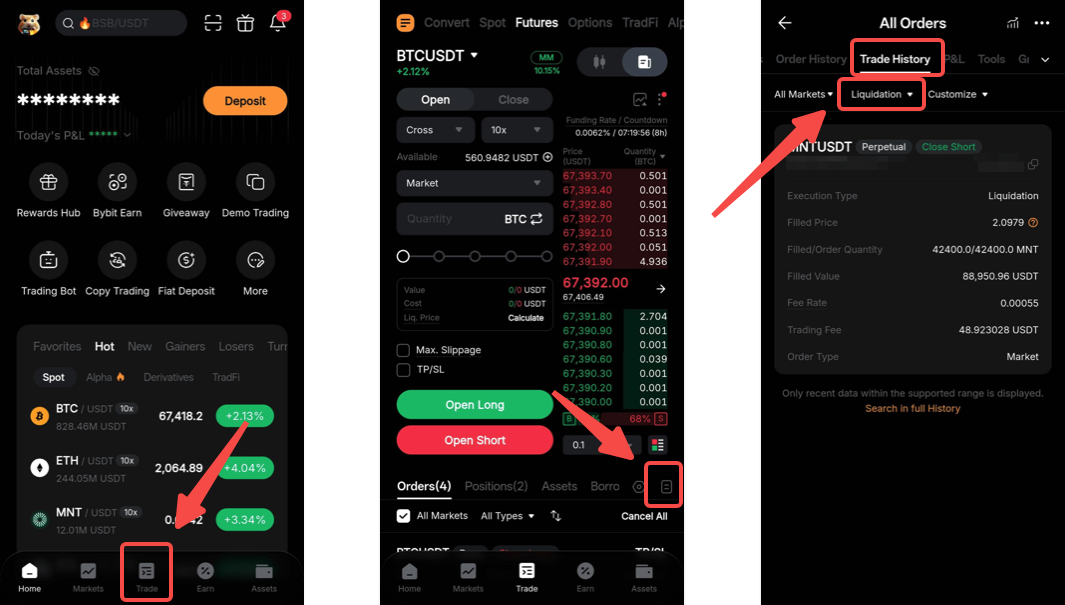
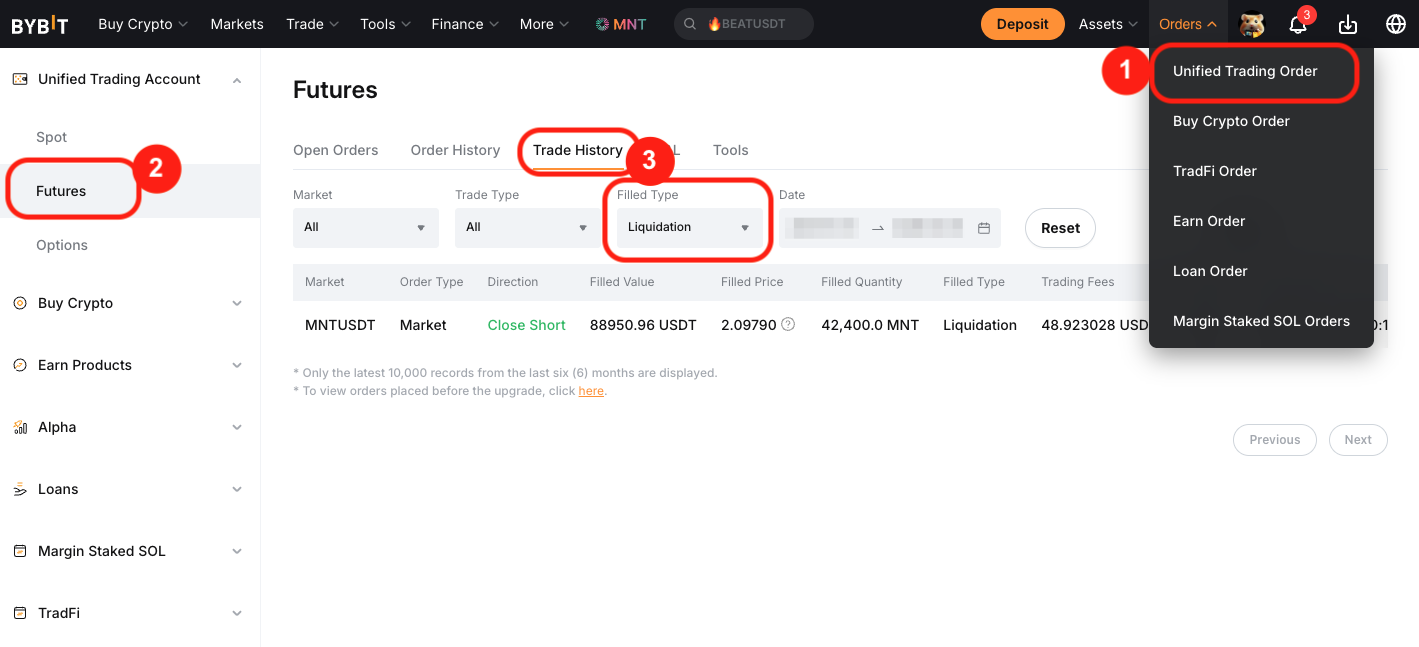
On the website, go to Orders in the top navigation bar and select Unified Trading Order. In the left-side panel, click Futures, then open the Trade History tab and select Liquidation from the Filled Type filter.