The P2P review feature added by Bybit is a great way for users to share their feedback on their trading experience. This feature allows users to leave reviews of their trading counterparties, which can help other users make informed decisions when selecting P2P ads to enhance the overall experience of Bybit P2P users.
Notes:
— Users are allowed to leave a review for their counterparty only for a Completed P2P order. Only one review can be left per user, based on their actual trading experience.
— Leaving a review of your trading counterparty after completing a P2P transaction is optional.
— For negative reviews, anonymous submissions will be disabled, and it is required to provide an explanation for dissatisfaction. If any inconsistencies are detected, we may take appropriate action.
— Reviews can be left, edited or replied to within 90 days of the order’s completion date. After 90 days, these actions will no longer be available.
Here’s a step-by-step guide to leaving, editing and replying to P2P reviews on Bybit.
Leave Your Review
Step 1: Once an order is completed, you can rate your trading experience by selecting either Good or Bad under Review.

Step 2: In addition to rating your trading experience, the Bybit P2P review feature also allows you to leave reviews of your trading counterparty.
You can choose to leave reviews anonymously, which means that your counterparties will not know who submitted them. To submit a review, simply tap Confirm after finishing writing.

Important Note:
Please note that the reviews you and other users leave on a counterparty's P2P profile page are visible to all P2P traders. Therefore, your reviews do matter and can influence other users' decisions when selecting a P2P ad. We encourage all users to leave honest and constructive feedback to help improve the trading experience for all P2P traders on the platform.

Edit/Delete Your Reviews
If you would like to edit or delete your reviews on Bybit's P2P trading platform, please follow the steps below:
Step 1: Go to the P2P Order List page. Tap All, then select Completed under the Status.

Step 2: Select the order you want to edit from the orders you have left a review on, then go to the My Ratings tab.

To Edit Your Review: Tap the edit button to edit.

To Delete the Review You Posted: Click the delete button to remove it.

Reply to a Review
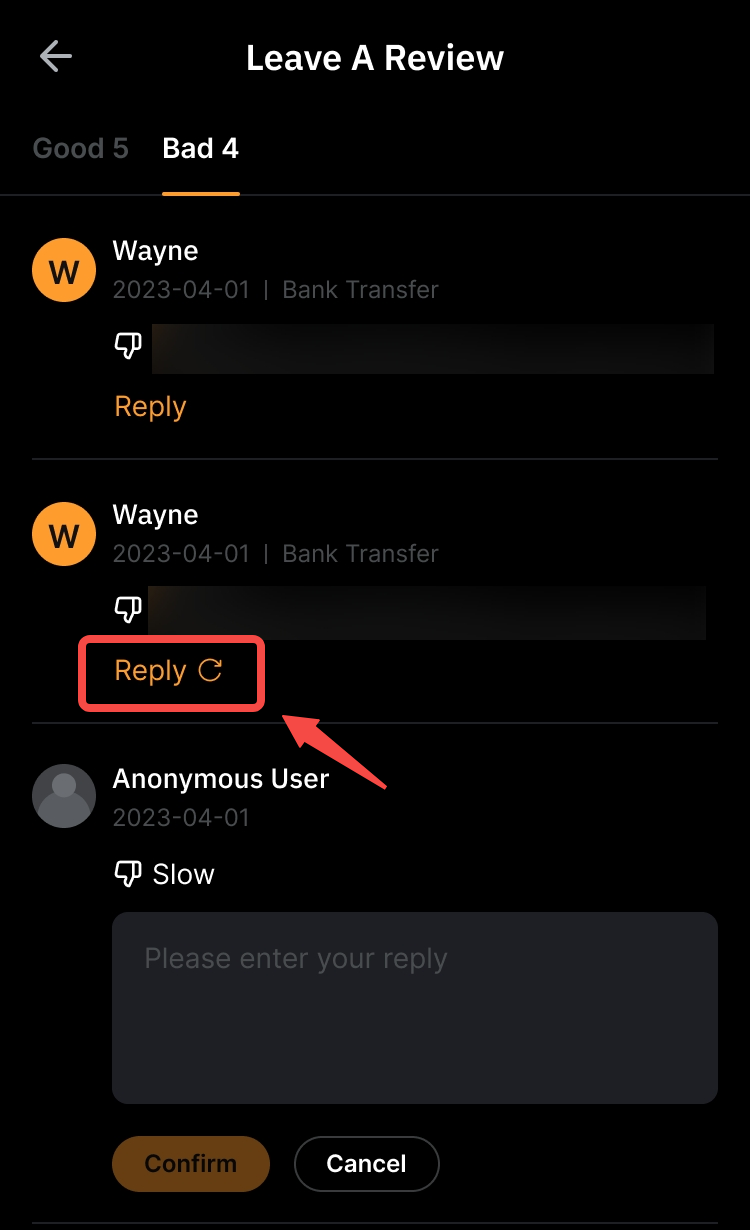
You can reply once to a negative review left by the counterparty if you believe it is inaccurate and would like to provide clarification. Your reply can be edited or deleted within 90 days of the order’s completion time.
Step 1: Go to Review → Bad on the P2P User Center page.

Step 2: Tap the Reply button below the negative review you want to respond to, then provide your clarification or additional context.

You can edit your reply by tapping the Edit icon, or delete it by tapping the Delete (bin) icon.

Notes:
- The Reply feature is only available for negative reviews. Positive reviews cannot be replied to.
- You can submit only one (1) reply for each negative review.
Can I Remove a Negative Review?
Bybit does not remove negative reviews left by the counterparty on your behalf. You cannot edit or delete a review posted by another user, even if you disagree with the rating or comment.
Your available options depend on whether you posted or received the review:
1. Reviews you posted:
- Select Edit to update a review you left on another user’s profile.
- Select Delete to remove it.
2. Reviews you received:
- Select Reply to clarify the situation or provide additional context about the trade.